마이어드밴텍 가입

마이어드밴텍은 어드밴텍 고객을 위한 맞춤 포털 사이트입니다. 어드밴텍의 멤버가 되시면, 최근 제품정보, 웨비나 초대, 최신 할인/사은품 정보를 구독하실 수 있습니다.

바로 회원가입하시고 365일 언제라도 접속 가능한 맞춤 최신 정보를 확인하세요.

EdgeSync 360 / EdgeHub

EdgeSync 360 / EdgeHub는 엣지 단의 연결, 관리 및 분석을 원활하게 수행할 수 있도록 지원하는 IoT 엣지 디바이스 관리 플랫폼입니다.
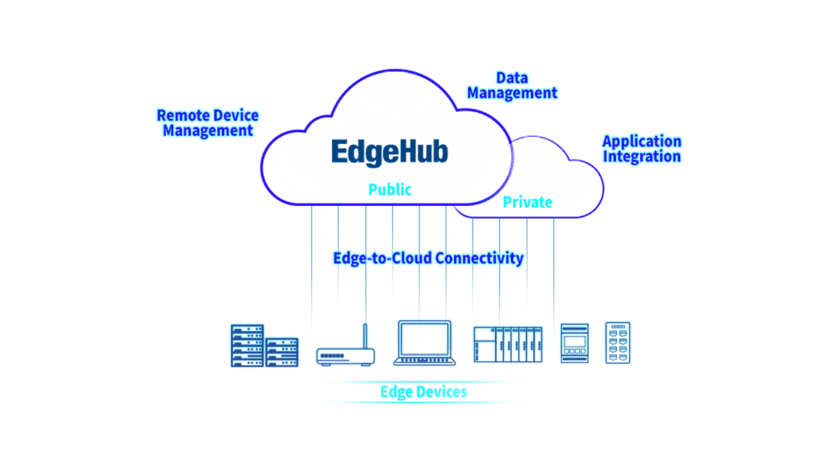
EdgeSync 360 / EdgeHub는 엣지 단의 연결, 관리 및 분석을 원활하게 수행할 수 있도록 지원하는 IoT 엣지 디바이스 관리 플랫폼입니다.

특징 및 이점

EdgeHub Banner

Keep Every Device Secure, Updated, and Under Control

EdgeHub turns Advantech devices into intelligent, manageable assets — simplifying updates, reducing costs, and keeping your operations running smoothly.

Save Time

Update thousands of devices with one click

Cut Costs

Fix issues remotely, reduce site visits

Stay Secure

Keep firmware always up to date

Gain Control

Real-time monitoring & alerts in one place

Core Features of EdgeHub

Zero-Trust Compliance

Implements security verification at every interaction point within the IoT ecosystem, including device identity, user credential and request context before granting access to resources.

Direct I/O & Centralized Configuration

Enables real-time monitoring of device status, remote control of device DI/O, AI/O, streamlined deployment of firmware updates and configuration files.

Secure Tunnel Access

Provides encrypted tunnel connections for authorized remote device access and maintenance, ensuring protected communication between devices and management system.

Edge App/AI Orchestration

Facilitates seamless deployment and version-controlled management of edge applications and AI inferences across distributed workstations.

Multi-Tenant Architecture

Supports isolated management for multiple organizations with separated device connections, data streams and access controls with each tenant workspace.

Service Integration Interfaces

Offers RESTful APIs for seamless integration with existing enterprise systems, analytics platforms and industry-specific solutions, enabling flexible data forwarding and service integration.

Easy Configuration of EdgeHub and ECU Tutorial

Frequently Asked Questions 

1. How do I get started with EdgeHub? 

(1) Through Edge Tools (ADAM Utility, EdgeLink Studio)     

    (a) Create your account through ADAM Utility or EdgeLink Studio.     

    (b) Bind your local devices directly to your EdgeHub account.  

    (c) Begin managing your devices immediately. 

 (2) Web Registration      

    (a) Create your account directly on the EdgeHub Website.

    (b) Follow online resources to register your devices. 

    (c) Explore remote management features.

2. Where can I find the newest release notes?

You can access our Release Notes page to stay informed about the latest updates, including new features, security enhancements, and performance improvements. The documentation is updated regularly to ensure you always have the most current information.

3. How do I access the training course?

We offer EdgeHub courses on Advantech IoT Academy, along with online technical documents, to ensure you get the most out of EdgeHub's capabilities.

4. What are the deployment options?

EdgeHub offers flexible deployment options to meet various organizational needs through cloud-hosted solution (SaaS), on-premises deployment, and private cloud deployment.

Industry Application 

EV Charging Management​

Remotely manages gateways connected to EV chargers​ Optimizing vehicle charging efficiency while ensuring power usage stays within capacity limits.​

Factory Device Management​

Remotely updating of I/O configurations, firmware, and applications on IPCs​ Ensuring efficient and seamless management of devices across production lines​

Wastewater Plant Monitoring​

Visualizing and analyzing data​ Monitoring key indicators​ Improving system performance by quickly identifying issues​

Experience It First, Decide Later — Free Trial Now

EdgeHub Free Trial